Car Head Up Display
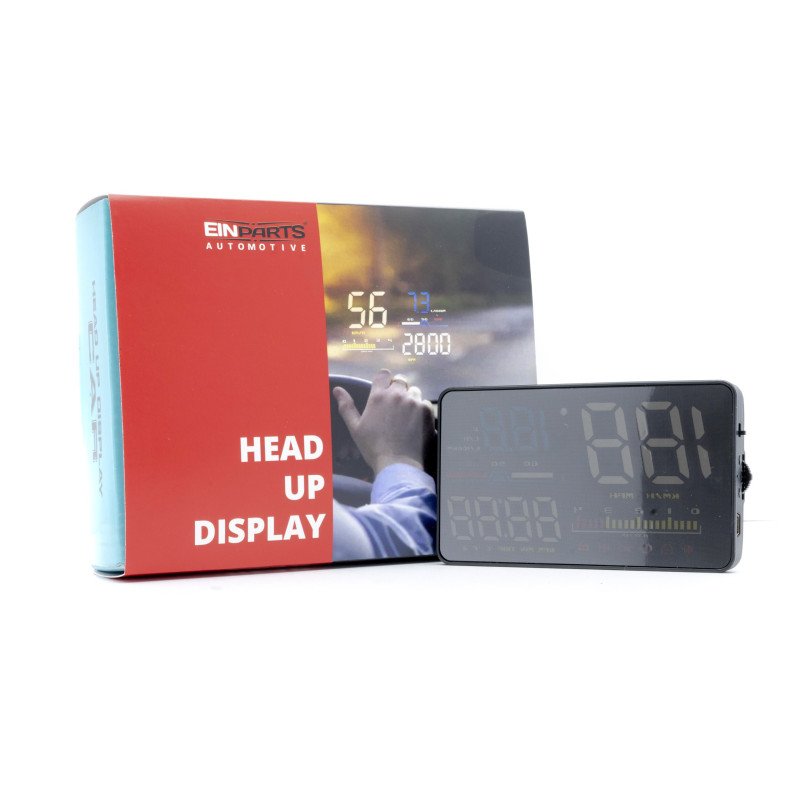
HUD short for Head Up Display. It displays driving datas on the front windshield such as speed, RPM, fuel consumption, water temperature, voltage etc on the car front window glass; avoiding drivers unsafety because of watching the instrument while driving.
Drivers can read the driving information instantly, and can always keep the best state on the way with HUD.
Normal
0
21
false
false
false
PL
X-NONE
X-NONE
/* Style Definitions */
table.MsoNormalTable
{mso-style-name:Standardowy;
mso-tstyle-rowband-size:0;
mso-tstyle-colband-size:0;
mso-style-noshow:yes;
mso-style-priority:99;
mso-style-parent:"";
mso-padding-alt:0cm 5.4pt 0cm 5.4pt;
mso-para-margin-top:0cm;
mso-para-margin-right:0cm;
mso-para-margin-bottom:8.0pt;
mso-para-margin-left:0cm;
line-height:107%;
mso-pagination:widow-orphan;
font-size:11.0pt;
font-family:"Calibri",sans-serif;
mso-ascii-font-family:Calibri;
mso-ascii-theme-font:minor-latin;
mso-hansi-font-family:Calibri;
mso-hansi-theme-font:minor-latin;
mso-bidi-font-family:"Times New Roman";
mso-bidi-theme-font:minor-bidi;
mso-fareast-language:EN-US;}
Information displayed:
- speed,
- engine speed,
- temperature of water,
- battery voltage,
- instantaneous fuel consumption,
- average fuel consumption,
- single driving distance,
- elimination of fault codes,
- Free switching between kilometers and miles.
Alarms:
- speed alarm,
- RPM alarm,
- gear change reminder,
- reminder of fatigue while driving,
- low voltage alarm,
- high temperature alarm,
- engine failure alarm
Function:
- acceleration time 100 km "
Screen size: 3.5 inch / 90x54x12mm
Product function
1. Driving Speed .
2. Light sensor: Automatically adjust the brightness according to the environment .
3. Multi-Functions area 1: battery voltage, Instantaneous fuel consumption,100 km instantaneous fuel consumption .
4. Water temperature icon .
5. Unit icon: V=voltage, L/H=(Liter/Hour), L/100KM=100 km instantaneous fuel consumption .
6. Power button .
7. Setting button .
8. USB port .
9. Unit icon: RPM=Engine speed, MIN=single driving time, TRIP=single driving distance, °C=Celsius, °F=Fahrenheit, a+=100 km acceleration time .
10. Multi-Functions area 2: Engine Speed, single driving time, single driving distance, water temperature,100 km acceleration time .
11. The icon shows: buzzer, over speed alarm, fault code, fatigue driving, shift reminder, voltage .
12. RPM icon
13. Speed unit: KM/H and MPH
Funkcje przycisków ustawień
1. Mini USB socket
2. WAVE button
1. Short pull up
(1) switch the multi functions area 1: battery voltage/Instantaneous fuel consumption/100 km instantaneous fuel consumption
(2) after entering into the setting menu, to add the default value
2. Short pull down
(1) switch the multi functions area 2: Engine Speed/single driving time/single driving distance/water temperature/100 km acceleration time
(2) after entering into the setting menu, to decrease the default value
3. Short press in
(1) switch the display mode (normal model/high speed mode/simple mode)
(2) after entering into the setting menu, to add the menu
4. Long pull down: turn off/on the buzzer, long pull down 5s to turn off the buzzer, do it again to turn on the buzzer.
5. Long pull up: all lights will be on, to eliminate the fault code, do it again to save and exit.
6. Long press in
(1) to enter into the setting menu when finish the adjustment, long press in the button to save and exit.
3. ON / OFF
Included:
Display
Cable (OBD)
Mini USB cable
Non-slip mat
Anti-reflective foil