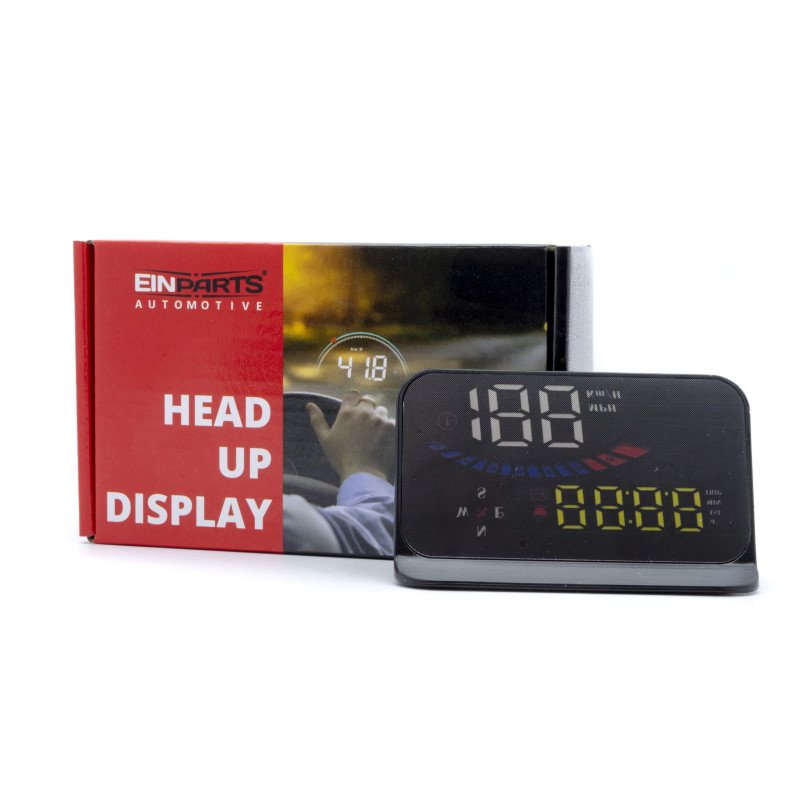
Car Head Up Display EPHUD01
HUD short for Head Up Display, the main function is to display the car dashboard information (e.g.speed, RPM, water temperature, voltage, trip distance etc.), and keep the driver eyes always on road to avoid the dangerous of lowering down head to read the dashboard.
Information on the display:
- driving speed,
- clock,
- satellite numbers,
- height,
- voltage,
- switching between kilometers and miles
- driving time,
- driving direction,
- automatic and manual brightness adjustment
Alarms:
- over speed alarm, voltage alarm;
Function:
- original with a hood, not glare during the day!
Screen size: 3,5 cala / 90x54x12mm
Product function
1. Satellite icon, flashing means searching for satellites, the GPS light stops flashing and stays on after the satellites are found
2. Driving direction: After the vehicle speed >5KM / H, display the driving direction, W=West, N=North, S=South, E=East
3. Overspeed alarm icon flashes when the vehicle speed exceeds the set value
4. Voltage icon and fatigue driving icon
5.Light sensor:HUD can automatically adjust the brightness according to the environment
6. Multi-function display area
7. a + =100km acceleration, ASL=altitude, MIN=travel time, TRIP=travel mileage
8. Display speed progress bar
9. Speed display area
10. Speed unit: MPH=Mile/hour, KM/H=kilometer/hour
Button functions
short press: press 1 second and release, long press: press 5s until the display image change.
1. Button M
Short Press M
(1) To Switch voltage, water temperature, vehicle speed
(2) To switch menu options or parameter values in menu setting mode
Long Press M
(1)To enter into menu settings (instructions for Menu 1-8)
(2)To save and exit once finished setting
2. Button -
Short press -
(1) to switch the speed icon
(2) reduce the menu or parameter value after entering the setting
Long Press -
to turn off the buzzer, press and hold again for 5 seconds to turn on the buzzer
3. Button +
Short press + , Menu + or parameters value + Long Press + ,to make the screen full bright, long press again to exit full light
4.Power switch: long press to turn off, long press to turn on again
5.Connection port 1: freely choice between interface 1 or 2 6.Connection port 2: freely choice between interface 1 or 2
Included:
Display
Charger
Non-slip mat
Anti-reflective foil